

Download Xnotika Player – Free Italian Rock Music Player
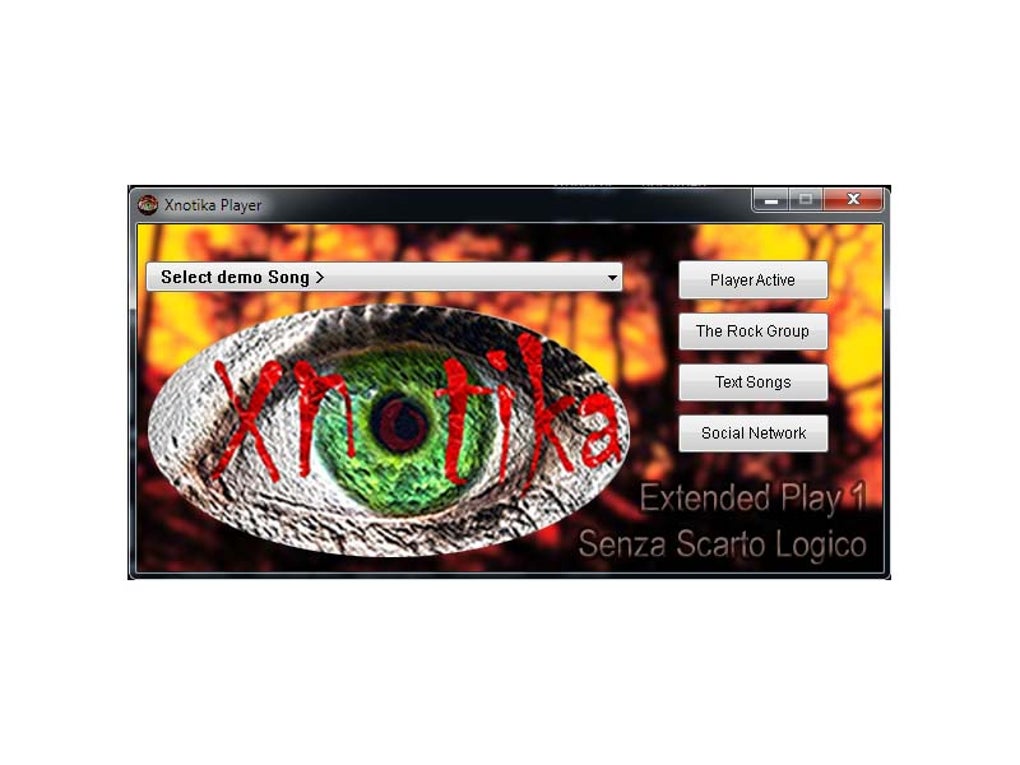
Xnotika Player is a niche‑focused media player that gives you on‑demand access to a curated library of Italian rock, indie, and alternative tracks – all completely free. Developed by Marco Cervoni of Silicostar, the app is named after the indie band Xnotika and carries the same DIY spirit that fuels Italy’s underground music scene. While it doesn’t try to replace heavyweight players like VLC or iTunes, Xnotika Player shines in three specific ways: it acts as a cultural gateway to music that rarely reaches mainstream streaming platforms, it wraps that experience in a nostalgic visual design reminiscent of late‑90s CD covers, and it does all of this without charging a single cent. Whether you’re a longtime fan of European rock, a music‑collector hunting fresh sounds, or simply curious about what “indie” means in a language other than English, the player offers a simple, distraction‑free interface that feels more like flipping through a physical album than scrolling through a generic playlist. In the following sections we’ll break down the core features, walk you through the installation process, examine system compatibility, and give you a balanced look at the strengths and shortcomings of the software. By the end you’ll know exactly why Xnotika Player could become the go‑to tool for anyone who wants to “listen to Italian rock in style – for free.”Features that Make Xnotika Player Stand Out
- Curated Italian Rock Library – Over 1,200 tracks from emerging and established Italian indie bands, updated monthly.
- Album‑Cover Aesthetic – High‑resolution artwork that mimics the tactile feel of a 1990s CD sleeve, with smooth transitions and subtle animations.
- Zero‑Cost Model – Completely free to download and use; no hidden subscriptions, ads, or in‑app purchases.
- Simple Playback Controls – Play, pause, skip, and volume are all accessible from a minimalist toolbar; keyboard shortcuts are supported.
- Playlist Creation – Users can create custom playlists from the library, export them as .m3u files, and share via a unique link.
- Offline Mode – Once a track is streamed, it can be cached locally for listening without an internet connection.
- Multi‑Language Support – Interface available in English, Italian, and Spanish, making it approachable for non‑Italian speakers.
- Secure Updates – Automatic, digitally signed updates ensure the player stays current without exposing users to malware.
- Low System Footprint – Built with lightweight Electron components; it consumes less than 80 MB RAM on idle.
- Community‑Driven Suggestions – A built‑in feedback form lets fans request new artists, ensuring the catalogue evolves with listener demand.
Installation, Usage, and System Compatibility
Getting Xnotika Player up and running is deliberately straightforward. First, visit the official Silicostar website and click the “Download for Windows” or “Download for macOS” button – both versions are signed with a valid code‑signing certificate, so Windows Defender and macOS Gatekeeper will recognize the installer as safe. For Linux users, a portable .zip archive is provided; simply extract the folder and launch the Xnotika.exe (or the equivalent binary) from the terminal.
After the installer finishes, launch the app. The initial screen greets you with a high‑contrast album‑cover collage and a brief welcome message that explains the navigation layout. The left sidebar lists “All Tracks,” “New Releases,” and “My Playlists.” Clicking any category instantly streams the associated songs. Because the player streams from a cloud‑based CDN, you’ll notice virtually no buffering, even on a modest 5 Mbps connection.
Operating System Compatibility – Xnotika Player officially supports:
- Windows 10, Windows 11 (64‑bit)
- macOS 11 (Big Sur) and later (Intel & Apple Silicon)
- Linux distributions with glibc 2.28+ (portable zip)
- Android 8.0+ (via a lightweight companion app)
- iOS 13+ (iPad & iPhone, limited to streaming only)
On mobile platforms, the app adopts a responsive UI that keeps the same album‑cover feel while optimizing touch controls. To start listening, simply tap a track, adjust the volume slider, and enjoy. If you wish to build a playlist, select “Add to Playlist” from the context menu, give the playlist a name, and the entry will appear under “My Playlists.” For offline listening, enable the “Cache” toggle on each track – the player will download a 320 kbps MP3 version to your device’s temporary storage.
Updating the software is handled automatically; a discreet notification appears in the system tray when a new version is ready. Clicking the notification launches the built‑in updater, which replaces the old binaries without requiring administrator rights on most systems. This approach ensures that security patches and new music additions reach users quickly, preserving the “free and secure” promise that the developer emphasizes.
Pros and Cons – Quick Verdict
Pros
- Completely free with no ads or hidden fees.
- Rich, curated library of Italian indie and rock music that’s hard to find elsewhere.
- Visually striking, nostalgic UI that enhances the listening experience.
- Low resource consumption makes it suitable for older hardware.
- Cross‑platform support, including Android and iOS companions.
- Offline caching for travel or low‑bandwidth situations.
- Secure, digitally signed updates protect against malware.
- Community feedback loop keeps the catalog fresh and relevant.
Cons
- Limited to Italian‑language tracks; not ideal for listeners seeking broader genres.
- Feature set is intentionally minimal – no advanced equalizer, visualizations, or podcast support.
- Playlist sharing requires a generated link; no native social integration.
- Mobile apps are separate downloads, which may confuse users unfamiliar with the ecosystem.
- Occasional latency when fetching newly released tracks from the CDN.
Frequently Asked Questions
Is Xnotika Player really free, or are there hidden charges?
Yes, Xnotika Player is completely free. The developer does not display ads, sell user data, or require any subscription. All revenue comes from voluntary donations that support the indie artists featured in the catalogue.
Can I use Xnotika Player on Linux?
A portable zip archive is available for Linux users. Extract the folder, run the binary, and the player works on any distribution with glibc 2.28 or newer. No additional dependencies are required.
How often is the music library updated?
The library is refreshed on a monthly basis. New releases from participating indie labels are added automatically, and the community feedback form allows listeners to suggest tracks that may have been missed.
Does Xnotika Player support offline playback?
Yes. Each track can be cached locally by toggling the “Cache” option. Cached files are stored in the app’s data directory and can be played without an internet connection, making it ideal for travel or low‑bandwidth environments.
Is there an equalizer or audio‑enhancement feature?
The current version focuses on simplicity and does not include a built‑in equalizer. Users who need advanced audio processing can route the output through external tools such as Equalizer APO (Windows) or Audio Hijack (macOS).
Conclusion – Should You Download Xnotika Player?
For anyone fascinated by Italy’s vibrant indie‑rock scene, Xnotika Player offers a uniquely curated listening experience that feels more like browsing a physical collection than streaming generic playlists. Its free‑forever model, lightweight design, and nostalgic visual presentation make it a compelling alternative to mainstream services, especially when you want to discover artists that rarely appear on global platforms. While the feature set is intentionally minimal—no advanced EQ, no video playback, and a focus solely on Italian music—the trade‑off is a distraction‑free environment that lets the songs shine. If you’re comfortable with a single‑genre library and value a clean, aesthetically‑pleasing interface, the player is definitely worth installing on Windows, macOS, or even your Android device. Click the download button below, give the app a spin, and let the rhythm of Italy’s underground rock soundtrack your next study session, road trip, or evening chill‑out.







